
Modpack Reposting Incentive Program Guidelines
1. Signing In
Open pack.coreyun.net and sign in with the account and password provided by the site administrator.

2. Start Publishing
- Click the Resources section in the top navigation bar
- Once inside, click the Add resource button in the top-right corner

- In the dialog that opens, select Modpack

The tutorial below uses the “Utopia” modpack as an example.
3. Finding Resources
Go to bbsmc.net or xyebbs.com

Look for the modpack resource; authors usually provide download links for Quark, Xunlei, or Baidu Netdisk. After opening the share link, follow the folder path to find the server-side modpack, download it locally, and open it.

4. Modpack Packaging Requirements
Important: modpacks that do not follow the format below will not take effect after they are uploaded!
- The archive root directory must contain a
start.shfile

If there is no
start.sh, handle the archive as follows:- A
.batfile but no.shfile: common in all-in-one “lazy packs”; you need to repackage it intostart.shformat.- The
shfile must not contain operations unrelated to launching the server, such as downloading Java. If it does, start the server locally first and then rewrite the startup script (you can ask an AI to convert bat syntax to sh).
- The
- A
.shfile that is namedrun.shor similar: simply rename it tostart.sh - Neither a
.batnor a.shfile: you need to write the startup script yourself (you can refer to the Utopia server and have an AI rewrite it)
- A
For any other case, consult the site administrator or ask in the group chat.
5. Uploading the Modpack
Once you have confirmed that the modpack is correctly formatted and can start normally:
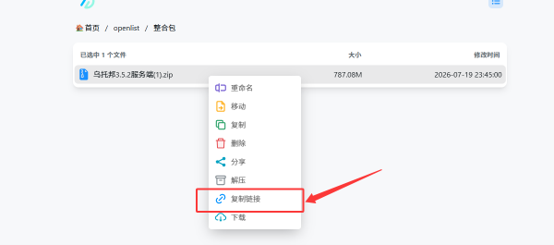
- Open openlist.coreyun.net and sign in with the login credentials provided by the site administrator

- Click the three dots (···) in the bottom-right corner of the page and select Upload Mode


- Select the correctly formatted modpack server files and upload them


- Close the window once the upload is complete
- Select the uploaded modpack and click Copy Link
6. Filling In the Publication Details
Return to the publishing page on pack.coreyun.net:
- Fill in the modpack information as shown in the images (obtain it from bbsmc / xyebbs)

- Paste the direct link copied from OpenList into the corresponding field

Below is an example of how the “Utopia” modpack is filled in (see the image).

- When you have finished editing, click Save at the bottom.
7. Notes
- Both publishing a resource and updating a resource's version number count as valid activity
- If a resource conflicts with one published by others, the reward is granted according to the earliest publication time
- If you have any questions, please contact the site administrator.