
University Student Verification Discount Terms
90% Off Your First Month · 50% Off Every Renewal, Permanently · Available on All Servers
Welcome to the exclusive benefits program that CoreCreate Cloud (www.coreyun.net) has launched for university students across the country!
Whether you want to run a server for Minecraft, CS2, Rust, or any other game, every plan currently on sale qualifies for 90% off your first month and 50% off every renewal, permanently!
To enjoy this discount, however, you must first complete real-name verification through CHSI. This guide walks you through, step by step, how to obtain the verification code for your Online Verification Report of Student Record and complete student status verification with CoreCreate Cloud.
✅ Who qualifies: full-time undergraduate, associate-degree, and master's students currently enrolled at a college or university
📅 Processing: manual review, completed within 24 hours
🔐 Security commitment: all information is used solely for identity verification and is kept strictly confidential
📝 Verification Process Overview
- ✅ Sign in to CHSI and apply for the Online Verification Report of Student Record
- ✅ Obtain the 12- or 16-digit “Online Verification Code”
- ✅ Go to the CoreCreate Cloud website and submit the verification form
- ✅ Wait for approval, then immediately enjoy 90% off your first month
🧭 Step 1: Sign In to CHSI and Apply for the Verification Report
1.1 Visit the Official CHSI Website
Open your browser and go to the China Higher Education Student Information website (CHSI):
👉 https://www.chsi.com.cn
⚠️ Always use the official URL above, and beware of phishing websites!
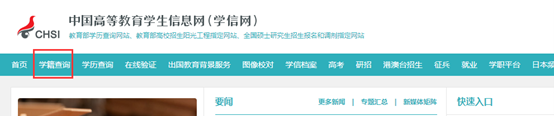
Figure 1: Visiting the official CHSI website
1.2 Sign In to Your Personal Account
Click the “Log In” button in the top-right corner of the page, then enter your CHSI account (mobile number or ID number) and password to sign in.
💡 Tip:
- If you have not registered yet, click “Register” and follow the prompts to complete real-name registration (you will need to link your ID card and mobile number)
- Using a desktop browser is recommended for better compatibility

Figure 2: Signing in to your CHSI account
1.3 Open the Student Record Query Page
After signing in, click the “Student Record Query” or “Online Verification Report” section on the homepage.
🎯 Students currently enrolled should select: Online Verification Report of Student Record
🎯 Veterans / previous graduates should select: Online Verification Report of Higher Education Qualification Certificate
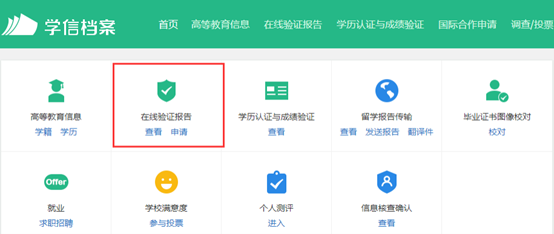
Figure 3: Selecting the “Online Verification Report of Student Record”
📄 Step 2: Generate and View the Verification Report
2.1 Apply for the Verification Report
Click the “Apply” button, and the system will automatically generate your Online Verification Report of Student Record.
✅ Your first application is free of charge
⏳ Generation time: about 10–30 seconds
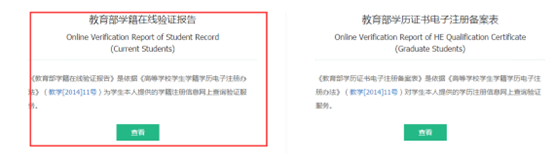
Figure 4: Clicking “Apply” to generate the report
2.2 View the Report and Copy the Verification Code
Once the report has been generated, click the “View” button to open the detail page.
On the page, locate the “Online Verification Code” (a 12- or 16-digit number) and be sure to copy and save it accurately — it is the core credential for your verification.
🔢 Examples:
123456789012orABC1234567890123
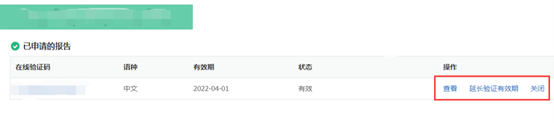
Figure 5: Locating and copying the “Online Verification Code”, shown on the left of the image
2.3 (Optional) Extend the Validity Period of the Report
CHSI verification reports are valid for 6 months by default. If your report has expired, click “Settings” → “Extend Validity Period”; the validity period can be extended by up to 6 months.
📅 Recommendation: make sure the report has at least 7 days of validity remaining before you submit your verification
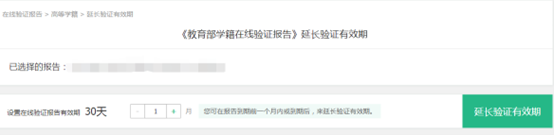
Figure 6: Extending the validity period of the verification report
🖥️ Step 3: Submit Your CoreCreate Cloud Student Verification
3.1 Open the CoreCreate Cloud Verification Page
Visit the CoreCreate Cloud website: www.coreyun.net
In the top navigation bar of the homepage, click the “Student Verification” button to open the verification form.
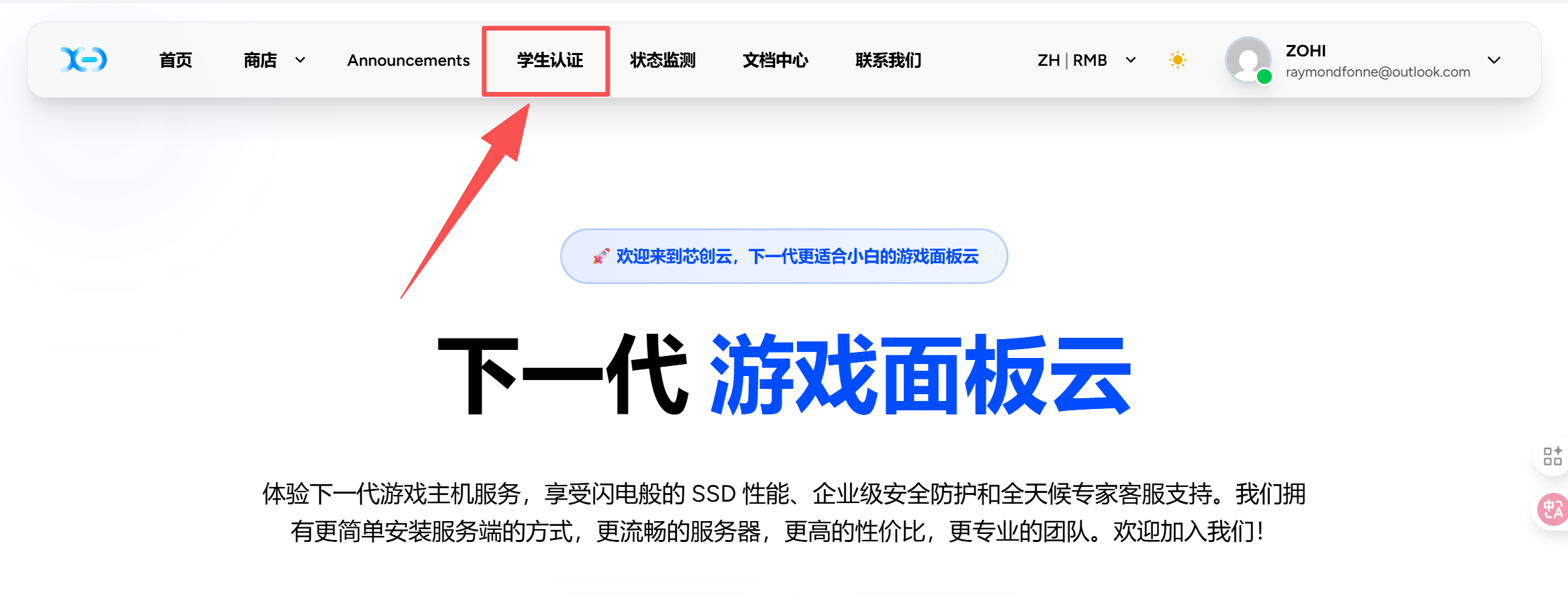
Figure 7: The CoreCreate Cloud homepage — click “Student Verification”
3.2 Complete the Verification Form
Please provide the following information truthfully:
| Field | Description |
|---|---|
| Registered email | ✉️ The email address you used to register your CoreCreate Cloud account (used to link your identity) |
| Full name | 📝 Your name in Chinese, exactly as it appears on CHSI |
| School name | 🏫 The full name of the institution where you are enrolled full-time |
| CHSI verification code | 🔢 The 12- or 16-digit code copied from CHSI |
| Photo of yourself | 📸 Upload a clear, front-facing photo of yourself (holding your ID card or student ID card is recommended) |
📎 Supported formats: JPG, PNG; a file size of 5 MB or less is recommended
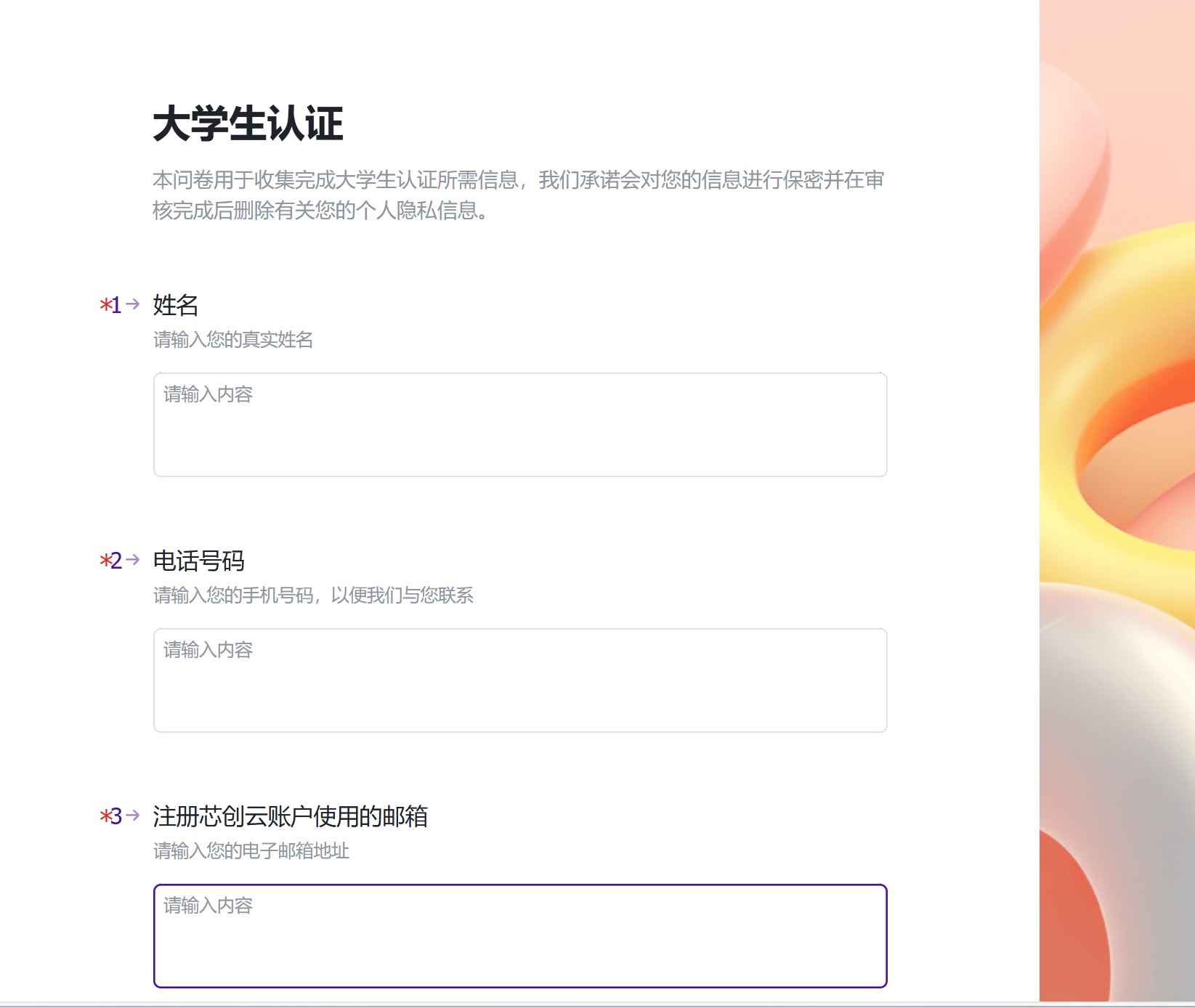
Figure 8: Completing the verification form
3.3 Submit and Wait for Review
Once you have confirmed that all the information is correct, click “Submit Verification”.
- ✅ The system will automatically send a confirmation email to the address you provided
- ⏳ Manual review will be completed within 24 hours
- 📩 The review result will be sent to you by email and site notification

Figure 9: The submission success message
✅ How Do I Launch a Server After My Verification Is Approved?
- Sign in to the CoreCreate Cloud control panel: https://panel.coreyun.net
- Choose any server plan (all plans currently on sale are eligible for the discount)
- The system will automatically recognize your student status
- At checkout you will enjoy the following:
- 90% off your first month
- 50% off every renewal, permanently
🎮 With the CoreCreate Cloud custom game cloud panel, you get one-click installation, real-time monitoring, and automatic backups — your server launches in a flash!
⚠️ Important Notes
- ❌ Using another person's verification code or submitting falsified information is prohibited; any such case shall result in a permanent account ban
- 🧩 Each email address / ID number may be used by one account only
- 📅 The discount expires automatically after you graduate; the system will send an email reminder 30 days in advance
- 🛠️ If your verification is rejected, please check:
- whether the email address is the one registered to your account
- whether the verification code is correct
- whether the photo is clear and recognizable
- 📞 Customer support: QQ
📞 Frequently Asked Questions (FAQ)
Q: Can I complete the verification without a student ID card?
A: Yes. You only need to provide your CHSI verification code and a photo of yourself.
Q: Can previous graduates or veterans take part?
A: Yes. Please apply for the Online Verification Report of Higher Education Qualification Certificate and submit the verification code.
Q: Where can I find the verification code?
A: Sign in to CHSI → Student Record / Qualification Query → View Report → copy the “Online Verification Code”.
Q: Is the 50% renewal discount permanent?
A: As long as your student status remains valid while you are enrolled, renewals are 50% off permanently.
Q: Do you offer refunds?
A: The 90%-off first month is a special promotional price and cannot be refunded once paid; renewal orders are handled under the standard policy.
🌐 Start Your Verification Now!
👉 Click here to open the CoreCreate Cloud student verification page
🎓 So that every university student can easily have a game server of their own!
🎉 CoreCreate Cloud · High-performance game cloud built for university students
✨ 90% off your first month | 50% off renewals | custom panel | low latency | high stability
Sincerely, the CoreCreate Cloud Team
Driven by technology · Serving the youth · Enabling the future with the cloud